

Review: Riffendium by Audiofier

A large variety of guitar loops from multiple genres
Loop sequencer and key switches allow you to customize and play up to 8 different loops within a single patch
Build your own customizable loops with up to 32 different loop slices
Nice-looking and intuitive interface
Double tracking feature brings instant professionalism and polish to the sound
Both processed (Riffendium) and unprocessed (Riffendium DI) guitar samples allow you to jump right in or use your own plugins to tweak the sound to your heart’s content
Randomize feature allows you to quickly create entirely new loops
100 snapshot presets with a variety of sounds
The Stutter Repeater is a bit difficult and confusing to use
Riffendium is a fantastic collection of customizable guitar loops that cover almost any genre.
Jump to the Videos of Riffendium by Audiofier
Jump to the Demos of Riffendium by Audiofier

Save 80% off RIFFENDIUM BUNDLE by Audiofier now $43.99 (reg $220.00)
http://bit.ly/2M5cINx
Review: Riffendium by Audiofier
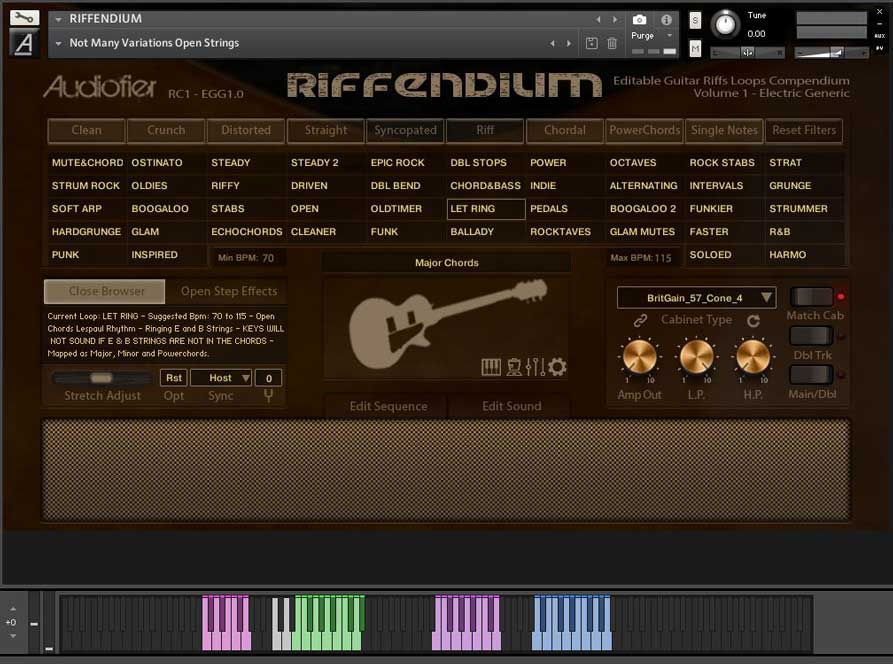
Are you a composer who wants to add great sounding guitars to your tracks but lack the guitar chops to do it on your own? Then check out Riffendium! Riffendium is the most flexible guitar loop instrument I have ever used.
Some will think that calling a guitar loop library an “instrument” is misleading, but I think it applies to this great-sounding, customizable and intuitive Kontakt library from Audiofier. There is plenty of variety to cover just about any genre (from Punk and Grunge to R&B and Oldies), and the ability to paste up to 32 loops slices together to create your own loops is both fun and inspiring.
The interface is well thought-out, the guitar sounds are great, and the ability to use both processed (Riffendium) and unprocessed (Riffendium DI) guitars means that you can either dive right in or customize the guitar sounds as much as you want.
Riffendium rocks! (and funks, and grunges, and strums, and…)
Riffendium sells for $85.00 from Audiofier
Thoughts
When I was first asked to review Riffendium I wasn’t all that thrilled. I have several guitar loop libraries that I incorporate into my tracks now and then, but I don’t use a ton of guitar loops in my work. They are helpful from time to time, but they’re not something I typically get excited about. I haven’t found guitar loop libraries to be all that flexible.
I’ve had a sort of “one and done” mentality about guitar loops; that is, once I have used a loop within a song, I pretty much have to retire it in order to avoid other tracks ending up sounding the same. Riffendium has reintroduced me to what a guitar loop library can be. The loops within Riffendium not only sound great – they are flexible, customizable, and offer the ability to be used in multiple compositions without being pegged as “overused.”
Riffendium’s interface is clean and straight-forward while offering powerful and intuitive customization options that allow you to customize your guitar’s sound and performance.
There is a very helpful genre selection feature at the top of the interface that allows you to find the guitar sound you are looking for using 9 different tags. These tags can be combined to further narrow your search until you find the right sound. Once you have selected one of the 44 different loop styles, you will see a selection of colored keys on the keyboard display in the bottom of the Kontakt window. The pink keys correspond to the 8 different user-assignable loop articulations within each genre. The next set of keys in white are used to play the loops. The remaining sets of colored keys correspond to different types of tuned loops within the genre (i.e. major, minor, 6th interval, etc.).
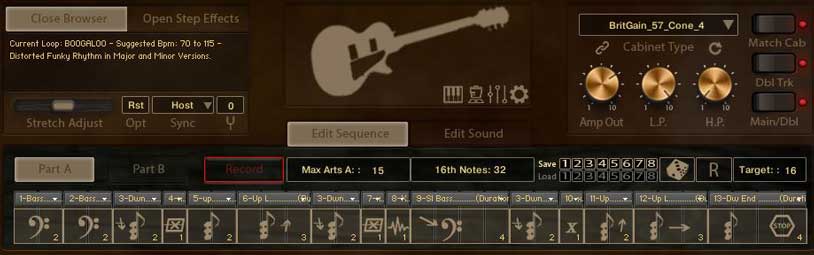
Riffendium Articulations
The heart and soul of Riffendium is the ingenious articulation sequencer (accessed using the Edit Sequence button). This is where things get really fun! When first entering the sequencer, there is a visual representation of one of the 2 factory loops that have been assigned to that specific genre. A dropdown box is provided at the top of each loop articulation that allows you to change the articulation from a handful of different loop slices for some genres to 20+ for others (depending on the loop genre you have selected). This gives you the ability to design a custom performance loop that can be very different from the factory loops. The key switches let you save up to 8 of these beauties to create a very unique performance.
Don’t want to go to the trouble of creating these all on your own? Simply click the Randomize button and allow Riffendium to mix it up for you!
I found this feature to be enormously helpful, as it allows you to quickly put something together without painstakingly assigning each individual articulation. Once you have assigned your 8 custom loops to the 8 key switches (in addition to the 2 factory loops that can be recalled at any time) you can be off and running with an entire track.
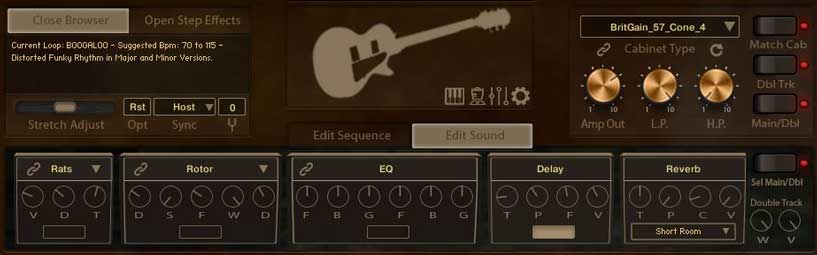
Riffendium Sound
It wouldn’t really matter how innovative or intuitive the engine and interface is if it didn’t sound great. The good news is that Riffendium sounds fantastic! Riffendium comes in two versions; Riffendium and Riffendium DI. Riffendium allows you to jump right in with great sounding guitars that have already been processed and polished for you. Riffendium DI presents the same loops recorded straight from the guitar output through a DI box to allow you to use your own amp simulators, plugins, and effects.
You can customize the sound of each loop within Riffendium using the Cabinet Type control, allowing you to process the sounds through several different guitar cabinets. By clicking the Edit Sound control, you also have access to distortion, modulation, EQ, delay, reverb, and a widener effect. My personal favorite effect is the double track feature (activate the Dbl Trk button), which actually triggers a different set of samples at the same time. This leads to variations in the loop performance, meaning it’s not a simulation of double tracking – it’s the real thing! I can’t tell you how great this sounds. It is polished and professional and will instantly add something special to your tracks.
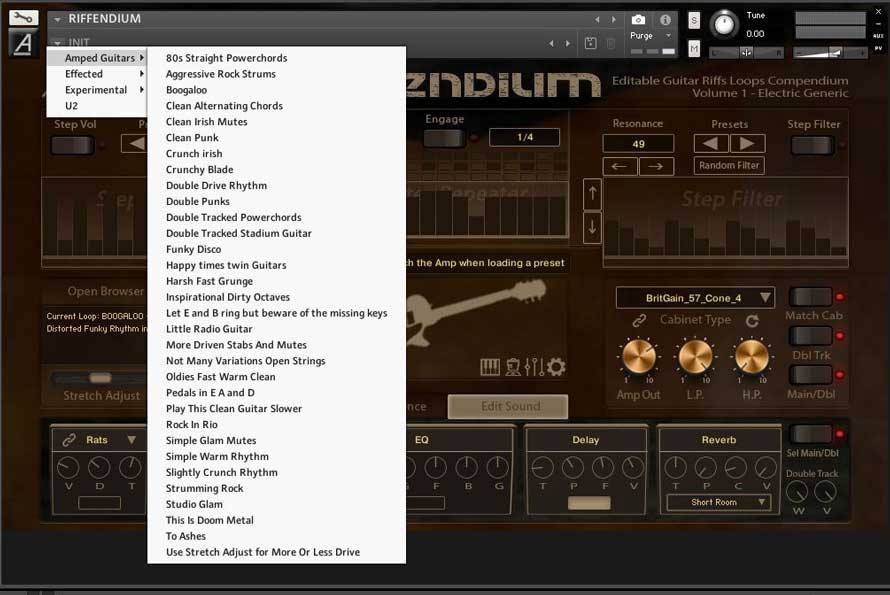
Riffendium Snapshots
Riffendium’s sound is enhanced by the inclusion of 100 snapshot presets, broken into Amped Guitars, Effected, and Experimental categories. These presets are a great way to quickly mix up the sound of the guitars within any loop genre, and even allow you to create otherworldly soundscapes.
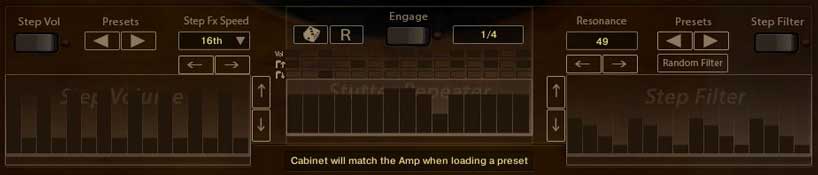
Riffendium Step Effects
Three other features I want to quickly touch on can be found when clicking the Close Step Effects button. Here you will find sequencers for Step Volume, Stutter Repeater, and Step Filter. These allow you to customize the sound even further, and, in the case of the Stutter Repeater, even make it something altogether different. I really like how both the Step Volume and Step Filter sequencers come with factory presets. I think the Stutter Repeater suffers from not offering this feature. The Stutter Repeater sequencer is a little difficult to use and could stand a little more love within the user manual.
Audiofier has created a winner with Riffendium.
Audiofier has created a winner with Riffendium. It is simply the most customizable guitar loop library I have ever used. The interface is straight-forward and looks great, and the whole thing just sounds fantastic. Audiofier has provided a 38-page manual to help you dive in, but I would highly recommend you watch their excellent Riffendium videos. These videos will help you quickly understand Riffendium and how to incorporate it into your music. If you are looking to add more guitars to your tracks without having to even pick one up, Riffendium just might be what you’re looking for. Riffendium has expanded my musical horizons and just might be the thing that leads me in a whole new direction. How much more can you ask from an instrument?
Facts
Riffendium by Audiofier provides 44 different genres of loops in multiple keys in addition to 100 preset snapshots. This library is over 7GB. Riffendium requires the full version of Kontakt 5.8 or above.
Riffendium sells for $85.00 from Audiofier
Demos of Riffendium by Audiofier
Videos of Riffendium by Audiofier
Contributor Raborn Johnson reviews Riffendium by Audiofier
“A fantastic collection of customizable guitar loops that cover almost any genre.